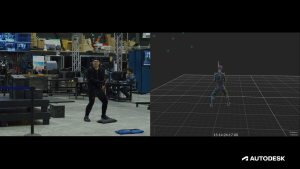
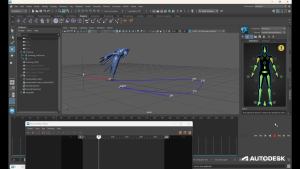
MotionMaker in Maya adds Bring Your Own Data, giving artists greater control and freedom over AI-assisted animation.
02
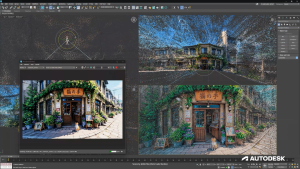
3D Gaussian Splats in 3ds Max enable artists to accurately represent and edit real-world objects and spaces
03
Review in Flow Production Tracking unifies media review, feedback, and real-time collaboration for post-production teams.
With MotionMaker, the first step is data capture, followed by data training and, lastly, generating your stylized and editable animation in Maya.
This week at SIGGRAPH 2026, Autodesk announced new capabilities coming to Maya, 3ds Max, Flow Production Tracking, and Arnold that address specific time-consuming parts of animation and visual effects production. Artists lose hours blocking out basic motion by hand, recreating real-world objects and locations, iterating slowly on lighting and materials, and coordinating reviews across distributed teams. These new tools are designed to ease each of these pain points and open new, more efficient, ways of working. Several of these capabilities also build on the rollout of AI-powered capabilities across those tools which included advances in Flow Studio released earlier this year. These are part of Autodesk’s commitment to make AI a practical creative assistant, without taking control away from artists. Here’s a closer look at some of the latest updates coming to Maya, 3ds Max, and Flow Production Tracking.
Bring your own animation data to MotionMaker in Maya
With MotionMaker, set a motion path, hit generate, and get stylized animation in seconds that you can iterate on.
MotionMaker in Maya adds a Bring Your Own Data feature, allowing teams to train custom generative motion models using their own rigs and animation datasets. The training data can include stylized motion-capture performances or hand-keyed animation. Once a model has been trained, it can generate foundational motion that artists can continue to direct, edit, and refine with familiar Maya tools, including Graph Editor, Time Editor, and Dope Sheet. This highly requested capability builds on MotionMaker’s existing support for generating biped, canine, and horse motion. For small teams especially, MotionMaker helps level the playing field by enabling artists to train a model once and reuse it, reducing repetitive animation work and freeing up more time for storytelling without sacrificing quality. Sheridan College’s Screen Industries Research & Training Center (SIRT) has already used MotionMaker to capture stylized performances and train custom models in Maya.
Create with 3D Gaussian Splats in 3ds Max
3ds Max makes 3D Gaussian Splats (3DGS) fully editable, giving you creative control across modeling, animation, and scene-building workflows.
3ds Max introduces 3D Gaussian Splats (3DGS), a powerful 3D data format that accurately represents real-world objects and environments. 3ds Max goes beyond simply displaying 3DGS by making it fully editable, giving artists complete creative control and the ability to integrate captured data into traditional modeling, animation, and scene-building workflows. Powered by a new point object system, each point stores position, orientation, scale, color, custom attributes, and instanced geometry, while remaining lightweight enough to handle complex datasets efficiently. For AI-assisted content creation, artists can bring environments created with tools like World Labs Marble directly into 3ds Max, to edit and refine AI-generated scenes as part of their existing workflows. And with native 3DGS rendering in Arnold, you can precisely control the look of your Gaussian Splats by adjusting lighting, shading, and color for your final render.
Review work together in Flow Production Tracking
Review in Flow Production Tracking is a unified review experience that makes it easier for post-production teams to review media, compare versions, provide feedback, and collaborate in real time within a single connected environment. Teams can host synchronized review sessions where multiple users can control real-time playback, annotations, and feedback, while inviting anyone from their Flow Production Tracking site to join, including users working in RV. Whether artists are reviewing remotely, directors are watching from a screening room, or teams are collaborating in Flow Production Tracking, everyone stays in sync with seamless playback across review experiences.
See changes happening in real time with interactive viewport rendering in Maya
Arnold interactive viewport rendering in Maya provides more immediate visual feedback as artists adjust lighting, materials, and scene composition. Artists can now see Arnold-rendered results directly in the viewport, helping them work much faster and at a higher quality. The shorter feedback loop makes it easier to explore creative options and refine complex scenes before committing to a final render.